Book Review Template for Readers, Not Book Reports (Free to Copy)
Book review template with six private prompts for adult readers, a matrix for DNFs, rereads and audiobooks, and a blank entry you can copy.
By Ultimate Book Tracker by Cosmo Suite · Editorial policy
Published · 8 min read

You finish a book, close the cover, and feel sure you'll remember it. Six months later you remember the cover color and not much else. A book review template fixes that in a few minutes.
A book review template is a short set of prompts for recording what a book was and why it mattered to you. This one is for adult readers who keep a private record, and nobody will grade it. You write for the person who opens this page next year and wants to know what that book was like.
Use the six prompts below as they are. Copy them onto paper or into a sheet, fill what you can, and skip the rest. They're yours to copy. Ultimate Book Tracker (by Cosmo Suite: one Excel and Google Sheets file, 14 tabs, $9 once) is a place to keep your reading record. If you'd like a spreadsheet for tracking your reading with a notes field for every book, there's a section on that near the end.
A reader's review is a record, not a report
A private book review is a short note you keep about a book you've read, for your own use later. Its job is recall. It tells future you what the book was, how you met it, and what's worth coming back to.
That purpose shapes what you write. Enough detail to jog your memory and to find the book again is all it takes, with no thesis, argument or verdict.
A formal report or review is written for an audience. A private review is written for you, and the only test is whether it helps you later. That's this post's own framing, and it decides how long an entry is, what it includes and what you can safely leave out.
Academic-writing guidance covers the other kind of task. The Purdue OWL page on book reviews discusses what a review is and contrasts it with a report. The UW-Madison Writing Center handbook describes active reading and note-taking for writing a review. Both are written for people who have to produce a review, so treat them as one example of the form.
You can borrow the habit of paying close attention while you read. Your own notes are yours to keep however you like. Leave the formal structure behind, because your review has one reader, and that reader already likes you.

Book review template at a glance
The best template is the one you'll finish, so match the form to the job. The table compares five common ways to record a book. Pick by what you want to find later.
| Form | What it holds | Best when | Watch for |
|---|---|---|---|
| One-line note | A single sentence | You're short on time | Easy to lose without book details |
| Six-prompt note | Details, memory, page, what stayed, a note for later, reread or recommend | You want a useful record in minutes | Skip prompts that don't fit |
| Academic review | A short description of the book plus an assessment of its strengths and weaknesses | A course or publication asks for one | Follows an assignment's rules |
| Printable review page | Space to write by hand | You like paper beside your chair | Needs filing so you can find it |
| Reading List entry | Review, notes and favourite quotes fields beside each book in a spreadsheet | You want to search and filter later | Only helps if you fill it in |
A one-line note is fine on a busy week. The six-prompt note is the middle path, which is why the rest of this post builds on it. You can use more than one form, and many readers do.
The six prompts
Six prompts cover the questions future you is most likely to ask. Copy them as written, and keep each answer short. A line or two is plenty.
- Book and format. Title, author and how you read it: print, ebook, audiobook or your own label. Add the edition or translation if it matters.
- One-sentence memory. What happened, or what the book was about, in a single sentence. Write it in your own words.
- A page reference. A page number, chapter or timestamp for a moment you'd want to find again. Note where it is, and don't copy any of the book's text.
- What stayed with you. A feeling, an image, an idea or a question that lingered. It can be small.
- A note for future you. Something you'd tell yourself before picking the book up again, or before choosing the author's next one.
- Would you reread it, and who would you recommend it to? This one is optional. A name, a type of reader or a plain "not sure" all work.
The first two prompts give you the record, and prompts three to five give you the texture. The sixth is a nudge for later, so you can leave it empty without guilt.
None of these asks for a verdict or a defense. They just leave you a trail.
Keep it blank-friendly
Any prompt may stay empty. That matters most when you stop reading a book partway. A DNF entry can hold the book details and a page reference for where you stopped, and nothing more. That's this post's own advice for a private record.
If you're unsure when stopping counts as a DNF, the DNF explainer walks through the term and how readers use it.
Fill it in with your own book, not a sample
You fill the template from your own reading, in your own words. This post doesn't include a sample review, because a sample would be someone else's reaction to someone else's book. A blank form is more useful.
This method works for any book:
- Write the book details first, while the book is in your hands.
- Wait a few minutes after the last page, then write your one-sentence memory without looking back.
- Add a page reference only if one comes to mind. If it doesn't, leave it.
- Write what stayed with you as if you were telling a friend in one breath.
- Finish with the note for future you, then stop.
Here's a blank entry you can copy. Replace each bracket with your own book and your own reaction.
Book and format: [title], [author], [format]
One-sentence memory: [one sentence in your words]
Page reference: [page, chapter or timestamp]
What stayed with you: [a feeling, image, idea or question]
Note for future me: [what I'd tell myself]
Reread or recommend (optional): [would I reread it? who might enjoy it?]
Which prompts to fill for each situation
The same six prompts don't fit every reading. A page number means little in an audiobook, and a DNF has no ending to remember. The matrix below shows where to write and where to leave a blank. Read "Fill" as worth your minute and "Blank is fine" as a choice you can make without guilt.
| Prompt | Finished book | DNF | Reread | Audiobook |
|---|---|---|---|---|
| 1. Book and format | Fill | Fill | Fill, and add the date | Fill, and mark the format |
| 2. One-sentence memory | Fill | Blank is fine | Fill, and note what changed | Fill |
| 3. Page reference | Optional | Fill with where you stopped | Optional | Fill with a timestamp |
| 4. What stayed with you | Fill | Blank is fine | Fill with what feels different now | Fill |
| 5. Note for future you | Fill | Optional, such as why you stopped | Fill | Optional |
| 6. Reread or recommend | Optional | Blank is fine | Optional | Optional |
For a DNF, two filled lines are a complete entry. For a reread, the useful part is the difference between this time and the last. For an audiobook, a timestamp does the job of a page number. Use the row for the situation you're in and ignore the rest.
Resist the urge to polish. Fragments are fine, and so are lists. If an answer takes more than a minute, write the short version and move on. You can add to an entry later, but you can't rebuild one you never started.
Copy it into a page or a sheet in four moves
Four moves turn the prompts into a habit. They work on paper or on a screen.
- Pick one medium. Choose paper or a sheet, and use it for every book. Switching halfway makes entries harder to compare.
- Copy the six prompts. Keep the same order each time. A familiar order makes the next entry faster.
- Fill it after you finish. Do it the same day if you can, while the details are fresh.
- Keep the entry beside the book. A review is useful later only when you can find it again.
A steady order also helps when you look back. Scanning the same prompt across several books shows patterns you'd never spot in loose notes.
On paper
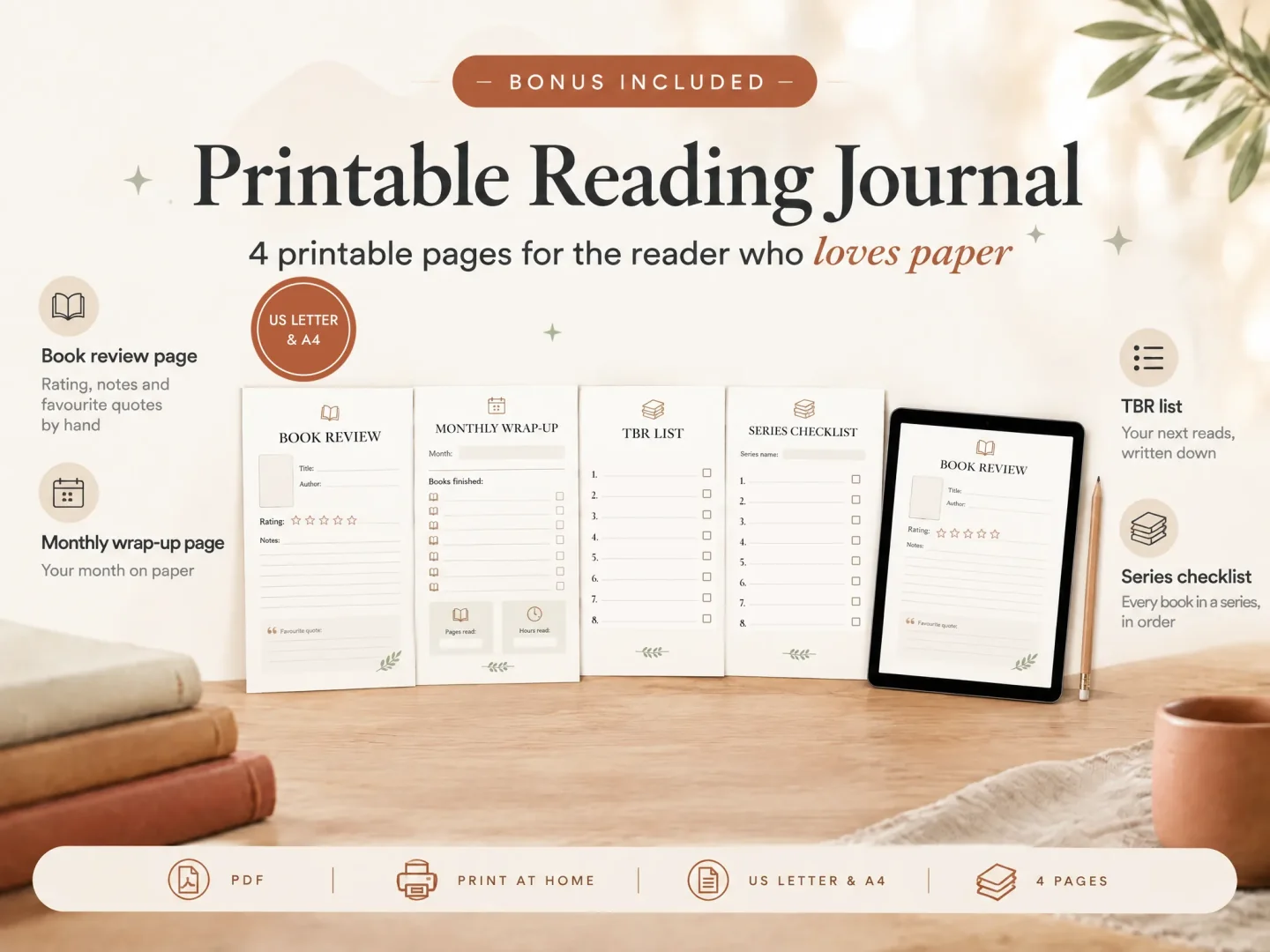
Ultimate Book Tracker includes a four-page printable reading journal in US Letter and A4, and one of those pages is a review page. You print it, write by hand, and file it with the rest. If you like paper, the reading journal template guide shows how to set up a journal around a page like this.
A plain notebook works too. Write the six prompts at the top of the first page, then copy them for each new book.
In a sheet
In the Ultimate Book Tracker spreadsheet, each book is a row in the Reading List. That row has review, notes and favourite quotes fields. Your six answers can go there, for example the one-sentence memory in the review field and the note for future you in the notes field. The tracker doesn't come with these prompts built in, so you paste or type them yourself.
When the list grows, you can search a title to open its Book Card. Book Filter narrows your books by up to 8 fields. Together they help you search and filter your whole library without scrolling through every row.
If you're still choosing a format for your whole record, the book tracker spreadsheet guide compares the options.
Where Ultimate Book Tracker fits
Ultimate Book Tracker, by Cosmo Suite, is a Google Sheets and Excel reading tracker with 14 connected tabs and room for 5,000 books. You get one Excel file and one Google Sheets file, and both have the same 14 tabs. The Reading List is where you log each book, and the other tabs update from it.
For publisher context, the About page names Cosmo Suite and says the blog uses AI-assisted drafts checked before publication. It links to an editorial policy and a contact page for article questions.
The four-page printable reading journal, with its review page, comes in US Letter and A4.
You don't need it to use the six prompts. A notebook and a pen are enough. If you'd rather keep your reading in one file, with search and filters when the list grows, the reading tracker for Excel and Google Sheets is one way to do that.
Start with the next book you finish: write the details, one sentence and a page reference if you have one, so your future self has somewhere to begin.
Frequently asked questions
What should a personal book review include?
Include only what future you will want to find: the book and format, one sentence about what happened, a page reference, what stayed with you, and a note for later. Add a would-reread or who-to-recommend line if it helps. Everything beyond the book details is optional.
How long should a personal book review be?
As long as the prompts need. A few short lines are enough for most books. A private review has no word count, and a short entry you finish is more useful than a long one you skip.
Can I leave prompts blank?
Yes. Any prompt can stay empty, especially for a book you didn't finish. A DNF entry might hold only the book details and a page reference. A blank prompt is a choice you made, and the entry is still fine.
Where can I keep reviews so I can find them later?
Keep each review beside the book it belongs to. On paper, that's a dated page filed in your journal. In Ultimate Book Tracker, the Reading List has review, notes and favourite quotes fields for each book. Searching a title opens its Book Card, and Book Filter narrows your books by up to 8 fields.
How many books can I log in Ultimate Book Tracker?
It has room for 5,000 books. You get one Excel file and one Google Sheets file, and both have the same 14 connected tabs.